
How to get more storage on your iPhone
An iPhone has no memory card slot, so you can’t add storage inside it. There are four real ways to get more room: clear what you don’t need, rent space in iCloud, buy a flash drive, or move photos and videos to a device you already own. Photos and videos are what fill most iPhones, so that’s where the space comes back.
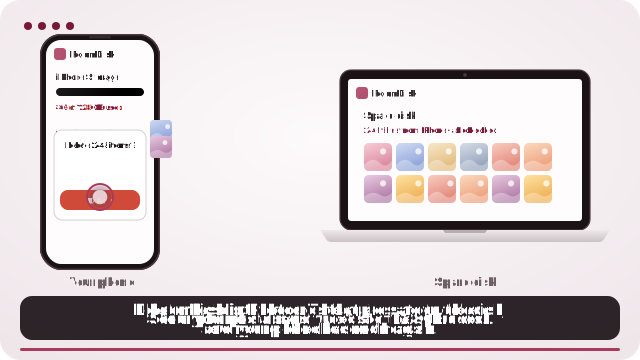
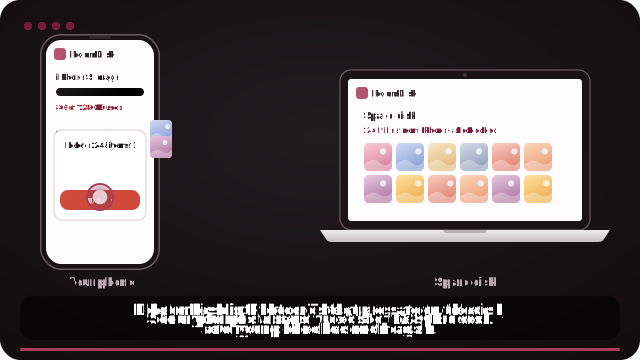
Move photos to a device you own
- Open roomdisk.com/app on the device that will keep the files and choose Use this device as the spare disk. It shows a QR code.
- On the phone or computer with the files, scan that code. A phone’s Camera app works: tap the roomdisk.com link that pops up. RoomDisk opens and shows its own code.
- On the spare disk, tap Scan reply and hold the phone’s screen up to its camera. (No camera there? Tap Share reply on the phone and open it on the disk device.)
- Send your biggest videos and albums first (Settings › General › iPhone Storage › Photos shows what’s large).
- Delete only what RoomDisk lists as safe to delete, then empty Recently Deleted in Photos to free the space.
Quick wins first (free, five minutes)
- Empty Recently Deleted in Photos: deleted photos keep using space for 30 days.
- Find the big videos: in Photos, open Albums › Media Types › Videos. A few minutes of 4K video can take several gigabytes.
- Offload apps you rarely use: Settings › General › iPhone Storage › Offload Unused Apps. The app goes; its documents and data stay, and it comes back with one tap.
- Keep messages for a year, not forever: Settings › Messages › Keep Messages. Big attachments in old chats add up.
If that’s not enough, the photo and video library has to live somewhere else. These are the three ways.
Your options, and what they cost
| iCloud+ | iPhone flash drive | A device you own (RoomDisk) | |
|---|---|---|---|
| Cost | From $0.99 a month (50 GB); 200 GB is $2.99 a month (US prices) | About $30 to $55 for a popular drive | $14.99 once |
| After 3 years | About $108 on the 200 GB plan, and still paying | The drive (if it hasn’t been lost) | $14.99 |
| Space | The plan you pay for | The drive’s size | Whatever the device has free: a 256 GB tablet holds roughly 50,000 photos |
| Automatic | Yes, in the background | No, through the drive’s app | No, you choose what to send |
| Port and adapters | None | Must match: Lightning (iPhone 14 and older) or USB-C (15 and later) | None: it’s wireless |
| Checks each copy | Handled by Apple | Rarely | Yes, on both devices, with receipts |
In a 2026 survey of 1,000 US adults, 70% of iPhone users said they pay for extra storage, about $70 a year on average. If that’s you, see what your plan adds up to.
Which to choose
- iCloud+ if you want everything backed up automatically, including app data and settings, and don’t mind the monthly fee.
- A flash drive if you want something you can carry and don’t have a second device. Choose one that matches your port. Common flash drive problems.
- A device you already own if there’s an old phone, iPad or laptop around: it becomes your iPhone’s extra storage, with nothing to buy and no monthly bill.
Many people mix them: a small iCloud plan for settings and messages, and the big photo library on a spare device. A closer comparison.
Using a spare device as extra storage
- A laptop or desktop: the most space; photos land in a normal folder.
- An old iPad or Android tablet: lives at home on its charger, ready for the whole family.
- An old phone: fine for photos; keep it plugged in while it receives. How to set up an old phone.
Send in batches: a few hundred photos or a few big videos at a time. If anything is cut off, send again and it continues where it stopped.
Before deleting, open a few photos and play a video from the disk under Files. RoomDisk never deletes anything from your iPhone itself; it tells you what’s safe and you decide.
On iPhone, for exact originals, tap Options in the photo picker and choose Current, or pick from the Files app. Otherwise iPhone may send converted copies (for example JPEG instead of HEIC).
Questions
Can I add storage to my iPhone?
Why is my iPhone full when I don’t have many photos?
Does deleting photos free space straight away?
If I have iCloud Photos turned on, can I delete photos from the phone?
Is it worth buying an iPhone with more storage?
Try it with the two devices you have
Pay once, keep it. Nothing to install, no account.