
Give your old phone a second life
Most of us have a phone or two in a drawer. It still has a good screen, plenty of storage and a working battery. Instead of recycling it early, let it hold your photos and videos, so your new phone has room again.
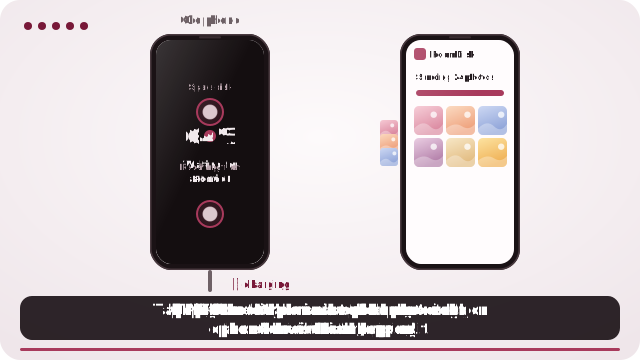
How to do it
- Charge the old phone and connect it to Wi-Fi.
- Open roomdisk.com/app on it and choose Use this device as the storage disk.
- On your current phone, scan its code and send your photos and videos.
- When each file says safe to delete, free the space on your current phone.
Why it’s worth it
- Less e-waste. Making a new phone has most of its environmental cost; using the one you already have a few years longer is the simplest way to cut it.
- Room on your new phone without paying for cloud storage every month.
- Your photos stay with you. They go straight from one of your devices to the other and nowhere else.
Is it safe to keep photos on an old phone?
Every file is read back and checked when it lands, and again every week. Even better, keep a second copy: another spare device at home, or a locked copy at a relative’s home that only you can open. Then any one device can fail and nothing is lost.
Look after the old battery
Keep it on its charger. On Android, RoomDisk waits until it’s charging before its weekly check and other background work, so an old battery isn’t worn down. Old iPhones get a calmer, lighter version of the app, so they stay smooth.
When you do pass it on
In Settings, Erase everything on this disk removes every file RoomDisk kept, checks that nothing is left and gives you a report. Then reset the phone in its own settings before it goes.
Questions
Which old phones work?
Does it need a SIM card?
What if the old phone stops working?
Try it with the two devices you have
Pay once, keep it. Nothing to install, no account.