
A PhotoSync alternative that proves every transfer
PhotoSync is a capable app with a long list of destinations. The reasons people look for something else come up again and again in reviews: transfers reported as finished with files missing, big videos that stall, and background limits on iPhone. RoomDisk does one job, moving photos and files between your own devices, and proves each copy before it calls anything safe to delete.
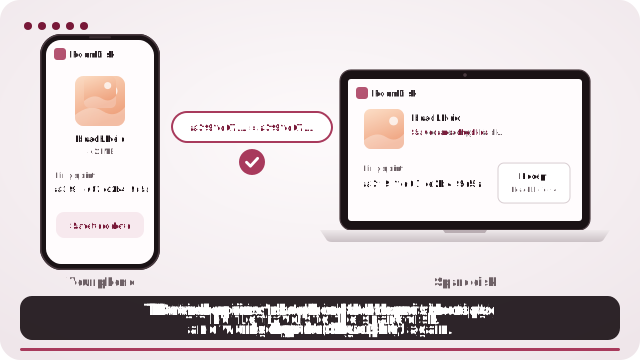
How to do it
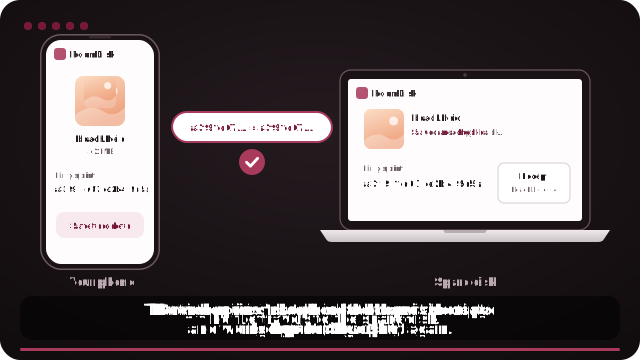
- Open roomdisk.com/app on the device that will keep the files and tap The storage disk. It shows a QR code.
- On the phone or computer with the files, scan that code. A phone’s Camera app works: tap the roomdisk.com link that pops up. RoomDisk opens and shows its own code.
- On the storage disk, tap Scan reply and hold the phone’s screen up to its camera. (No camera there? Tap the share button on the phone and open the link on the disk device, or use Paste code.)
- The first time, the disk asks Allow this phone? Both screens show the same 4-digit number: if they match, tap Allow. Then both say Connected: choose files and send. Each file is checked when it lands.
What PhotoSync users report
From public App Store reviews (summarised here):
- Transfers that report success even when some files didn’t upload, so users check by hand or lose photos after deleting.
- Large videos stalling a batch, sometimes holding up the files before them.
- iOS limits on how long transfers can run in the background.
- Slow transfers over Windows file sharing (SMB), faster over FTP.
- Upgrade options that only appear with full photo-library access.
Reviews also praise its many destinations, its settings and its support. Which app is better depends on what you need.
How RoomDisk is different
- Every file proven. The phone takes each file’s checksum; the disk saves it, reads it back and checks it again. Only matching files count as “safe to delete”, with a receipt per batch.
- Big videos finish. A cut-off transfer continues from where it stopped when you send again, and one large file doesn’t hold up the rest.
- Nothing to install. It runs in the browser on both devices: iPhone, Android, Windows, Mac, Linux.
- Reconnects by itself. Pair once; next time the phone finds the disk on your Wi-Fi in a second or two, no code.
- Pay once. RoomDisk Pro is $14.99, one payment.
Side by side
| PhotoSync | RoomDisk | |
|---|---|---|
| Install | App on the phone, companion app on the computer for some destinations | Nothing: the browser |
| Destinations | Computers, NAS (SMB, FTP, WebDAV), many cloud services | Your own devices: a computer, tablet or phone |
| Checks each copy | Not shown per file | Yes, SHA-256 on both devices, with a receipt |
| Cut-off transfers | Started again | Continue from where they stopped |
| Background on iPhone | Limited by iOS | Not in the background: you send while it’s open |
| Pricing | See the App Store | $14.99 once |
When PhotoSync is still the better pick
- You need to upload to a NAS over FTP or WebDAV, or straight to a cloud service.
- You want transfers triggered in the background by location or time.
- You already have a setup that works and you check your transfers.
Honest limit: iPhone doesn’t let web pages run in the background, so RoomDisk sends while it’s open. On a computer, Auto send can send a watched folder’s new photos every time you connect.
Switching takes five minutes
- Open RoomDisk on the computer or tablet that will keep your photos and choose The storage disk.
- Pair your phone once.
- Send your whole camera roll: photos already on the disk are recognised and skipped.
- Use Backed up? on the phone to see which photos are on the disk, by content.
PhotoSync is a trademark of its owner. RoomDisk isn’t affiliated with it.
Common questions from people switching
Will it re-send everything I already transferred?
Only what isn’t on the RoomDisk disk yet: photos it already has are recognised by their contents and skipped, so you can choose your whole camera roll.
Can it upload to my computer while I’m out?
With RoomDisk Anywhere ($29 a year), your paired phone reaches the disk at home from other networks: send new photos home, or browse and stream from it.
What about my NAS?
RoomDisk doesn’t speak FTP or SMB. A computer on your network can be the RoomDisk disk and keep files in any folder it can write to.
What “verified” means here
Not just “the upload finished”. Each file’s SHA-256 checksum is taken on the phone; the disk writes the file, reads it back from its own storage and computes the checksum again. Only a match counts, and the receipt on the disk lists every file and its checksum so you can check it yourself later.
Who RoomDisk suits
- People moving photos and videos between their own phone, tablet and computer.
- Anyone who wants proof before deleting, not just a “done” message.
- Families with a mix of iPhone, Android, Windows and Mac.
- Videographers offloading big clips over Wi-Fi or a hotspot.
Questions
Is RoomDisk free?
Can RoomDisk send to my NAS?
Does RoomDisk keep my photos’ original quality?
What happens if a big video transfer is cut off?
Does it work in the background?
Try it with the two devices you have
Pay once, keep it. Nothing to install, no account.