WD My Cloud remote access stopped working? Your options
Western Digital ended support for its older My Cloud software. Drives still on My Cloud OS 3 lost remote access, security updates and the OS 3 apps in 2022, and now work only on the home network (Western Digital). Your files are fine: they’re still on the drive. What you lost is reaching them from your phone when you’re out. Here’s what you can do.
Reach your files again with RoomDisk Anywhere
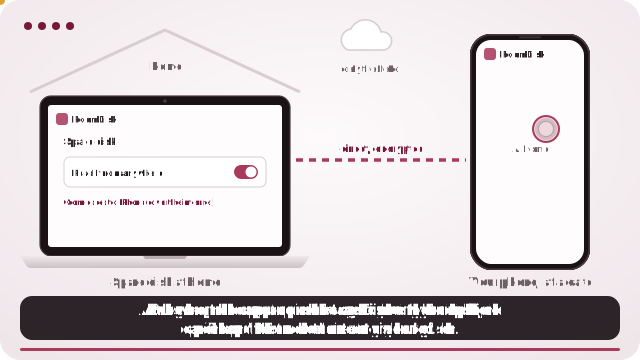
- On a computer at home, copy your library from the My Cloud to the computer, or to a USB drive plugged into it (the My Cloud still works on your home network).
- Open roomdisk.com/app on that computer in Chrome or Edge, choose The storage disk, and pick that folder.
- Pair your phone once at home: scan the code, show the reply, and tap Allow on the computer.
- On the computer, open the ☰ menu › Reach from anywhere and turn it on. Away from home, open RoomDisk on your phone and tap your disk under Your disks.
What still works on an unsupported My Cloud
- Your files, on the drive, as before.
- Access on your home network from a computer (as a network share) and, on many models, media streaming to TVs.
- Copying files off to a computer or another drive.
What stopped: reaching it from outside your home through Western Digital’s apps and website, and security updates. A drive without updates shouldn’t be opened to the internet another way either.
Option 1: upgrade, if your model can
Some My Cloud models can move to the newer My Cloud OS 5, which brings remote access back. Check Western Digital’s support page for your exact model before anything else: if it’s supported, that’s the simplest fix.
Option 2: a NAS from another brand
A Synology or QNAP NAS gives you remote access, phone backup apps and regular updates. It’s the most complete answer, and the most expensive: a new device, new drives, and an afternoon setting up users, shares and remote access.
Option 3: a cloud service
Move the library to iCloud, Google Drive, OneDrive or Dropbox. Easy to reach from anywhere, but you upload everything once and pay every month for as long as you keep it.
Option 4: a computer at home, reached privately with RoomDisk Anywhere
If you already have a computer at home, it can take the My Cloud’s job: keep the files (on its own drive or a USB drive), and let your phone reach them from anywhere with RoomDisk Anywhere ($29 a year). Nothing to open on your router, no new hardware, and your files go directly between your devices: they’re never uploaded to anyone’s servers.
| Upgrade to OS 5 | New NAS | Cloud service | Computer + RoomDisk Anywhere | |
|---|---|---|---|---|
| Cost | Free (if supported) | Device and drives | Every month | $29 a year |
| Setup | Firmware update | An afternoon | Upload everything | Copy files, open a page |
| Works when you’re out | Yes | Yes | Yes | Yes, while the computer is on |
| Phone backup | WD app | NAS app | Provider’s app | Send from the phone, checked |
| Files live | On the drive | On the NAS | Provider’s servers | On your computer |
Keep the My Cloud as your second copy
Don’t throw the old drive away: once the files are copied and checked, it makes a good second copy on your home network. Copy new files to it now and then from the computer, so one failed drive never costs you anything.
What to know before you choose RoomDisk
- The disk has to be on. It must be online with RoomDisk open. A laptop that sleeps when the lid closes can’t be reached; set it to stay awake while plugged in.
- Your files live in one place. They’re on that device only, not copied to a cloud. Keep a second copy of anything you can’t lose.
- Speed follows your home internet’s upload. Photos and documents are quick; big 4K videos may need to load before they play smoothly.
- Some networks block direct links. Many mobile carriers and some strict office or hotel Wi-Fi don’t allow devices to connect directly. There you still see your folders and small previews; the rest waits for another Wi-Fi. Check your network.
Western Digital and My Cloud, Synology, QNAP, iCloud, Google Drive, OneDrive and Dropbox are trademarks of their owners. RoomDisk isn’t affiliated with them.
Copying everything off the My Cloud
- On a computer on the same network, open the My Cloud’s share (Windows: File Explorer › Network; Mac: Finder › Network).
- Copy the folders to the computer or to a USB drive plugged into it. For big libraries, copy a year at a time.
- Compare folder sizes and file counts on both sides when it finishes.
- Leave the files on the My Cloud as well: it’s now your second copy.
How much space you need
Check the share’s size first (right-click › Properties on Windows, Get Info on a Mac). A 2 TB external drive covers most family libraries and costs less than a year of a 2 TB cloud plan.
Questions owners ask
Can the My Cloud itself be the storage disk?
RoomDisk runs in a browser on a computer, tablet or phone, not on the drive. The computer keeps the files and serves them; the My Cloud becomes the backup.
Will my phone backup still work?
The My Cloud app’s phone backup depends on Western Digital’s service. With RoomDisk, your phone sends photos to the computer instead, each one checked.
Questions
Why can’t I access my WD My Cloud remotely anymore?
Are my files on the My Cloud lost?
Can I upgrade my My Cloud to get remote access back?
Is it safe to open the old drive to the internet another way?
Do I need to open ports for RoomDisk Anywhere?
Try it with the two devices you have
Pay once, keep it. Nothing to install, no account.