Access your home files remotely, without port forwarding
The classic advice for reaching files at home is “forward a port on your router”. It often doesn’t work any more (many internet providers share one public address between customers), and when it does, it puts a service from your home on the open internet. There are better ways, from VPNs to tools that connect your devices directly with nothing to open.
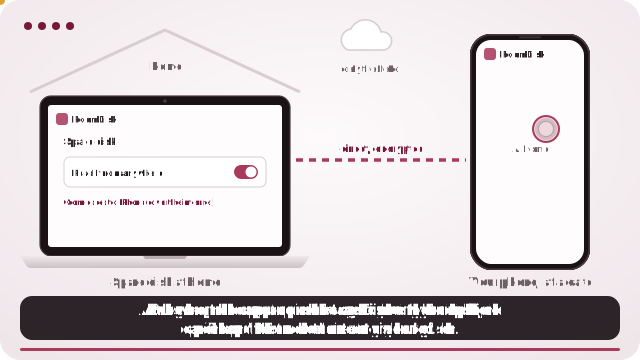
Set up RoomDisk Anywhere (nothing to open on the router)
- On the computer, tablet or old phone that will keep your files, open roomdisk.com/app and choose The storage disk.
- Pair your phone once at home: scan the code, show the reply, and tap Allow on the disk.
- On the disk, open the ☰ menu › Reach from anywhere and turn it on. Keep it plugged in and stop it from sleeping.
- Away from home, open RoomDisk on your phone and tap your disk under Your disks.
Why port forwarding is a poor fit now
- It often can’t work. Many providers, and most mobile networks, use carrier-grade NAT: your home has no public address of its own, so there’s nothing to forward to.
- It exposes a door. A forwarded port is reachable by anyone scanning the internet. A file server or NAS behind it has to be kept updated and well configured, forever.
- It’s fiddly. Router menus differ, addresses change, and a router replacement undoes it.
The alternatives, compared
| VPN to home (WireGuard, Tailscale) | A NAS’s relay service | Remote desktop | RoomDisk Anywhere | |
|---|---|---|---|---|
| Router changes | None with Tailscale; a port for plain WireGuard | None | None | None |
| Install | An app on each device | NAS + apps | An app on each device | Nothing: the browser |
| What you reach | Your whole home network | The NAS | The whole computer’s screen | The files on your storage disk |
| Good for | Technical users, many services | NAS owners | Running programs remotely | Getting at your photos and files |
| Cost | Free tiers exist | Comes with the NAS | Free tiers exist | $29 a year |
VPNs (WireGuard, Tailscale and similar)
A VPN puts your phone “inside” your home network. Tailscale and similar tools do it without router changes. It’s powerful, and the right choice if you run several things at home. It also means an app on every device and a little networking knowledge; families often find it too much.
Remote desktop
Shows the home computer’s whole screen on your phone. Ideal for running a program; slow and fiddly for “just get me that file”.
RoomDisk Anywhere
Built for one job: reaching the photos and files on your storage disk from your phone. Nothing to install, no router settings, and only devices you paired in person at home can connect.
How a direct connection works without opening a port
- Both devices share a secret from the first pairing at home.
- Away from home, your phone sends a short message, locked with that secret, through RoomDisk’s relay. The relay passes it on but can’t read it.
- The two devices use it to find each other’s public addresses and open a direct, encrypted link, the same technique video calls use.
- Files then go straight between your devices. Nothing is stored anywhere else.
Networks that block direct links
Some networks don’t allow devices to connect directly: many mobile carriers and some strict office or hotel Wi-Fi. There, RoomDisk still shows your folders and small previews (locked on your devices, passed along by the relay), and opening, saving and sending wait for another Wi-Fi. Check your networks before you buy: it takes three seconds.
What to know
- The disk has to be on. It must be online with RoomDisk open. A laptop that sleeps when the lid closes can’t be reached; set it to stay awake while plugged in.
- Your files live in one place. They’re on that device only, not copied to a cloud. Keep a second copy of anything you can’t lose.
- Speed follows your home internet’s upload. Photos and documents are quick; big 4K videos may need to load before they play smoothly.
- Some networks block direct links. Many mobile carriers and some strict office or hotel Wi-Fi don’t allow devices to connect directly. There you still see your folders and small previews; the rest waits for another Wi-Fi. Check your network.
WireGuard and Tailscale are trademarks of their owners. RoomDisk isn’t affiliated with them.
Which should you choose?
| If you… | Choose |
|---|---|
| Run several services at home (media server, home automation, files) and like to tinker | A VPN such as Tailscale or WireGuard |
| Need to use programs on the home computer | Remote desktop |
| Have a NAS and want its apps | The NAS vendor’s remote access |
| Mostly want your photos and files from your phone, with nothing to install | RoomDisk Anywhere |
Security, compared
- Port forwarding exposes a service to everyone; its security is only as good as its last update.
- VPNs expose nothing publicly; anyone with a VPN key gets into your network, so guard the keys.
- RoomDisk Anywhere exposes nothing on your router; only devices paired in person can connect, the relay only passes locked messages, and you can remove a device instantly.
Testing before you’re away
Run the network check at home and on your phone’s mobile data, then try connecting from a friend’s Wi-Fi once. Ten minutes at home saves an annoying afternoon when you actually need a file.
Questions
Can I access my home computer without port forwarding?
Is port forwarding dangerous?
Why doesn’t port forwarding work on my internet?
Does RoomDisk Anywhere work on mobile data?
Who can connect to my disk?
Try it with the two devices you have
Pay once, keep it. Nothing to install, no account.