A Dropbox alternative without a monthly fee
Dropbox Basic gives 2 GB free; Plus (2 TB) is $11.99 a month, or $9.99 a month billed yearly (Internxt, 2026). That’s $120 or more a year, every year, for storage you could already own. If what you mostly need is your photos and files reachable from your phone, a computer at home can do it.
Your own storage, reachable from anywhere
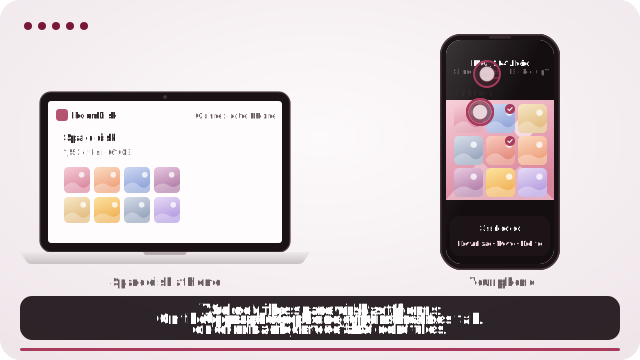
- On the computer, tablet or old phone that will keep your files, open roomdisk.com/app and choose The storage disk.
- Pair your phone once at home: scan the code, show the reply, and tap Allow on the disk.
- On the disk, open the ☰ menu › Reach from anywhere and turn it on. Keep it plugged in and stop it from sleeping.
- Away from home, open RoomDisk on your phone and tap your disk under Your disks.
What Dropbox does that’s hard to replace
- Sync the same folder across several computers.
- Share links with people outside your devices.
- Works when your computers are off: your files live on its servers.
- Version history and deleted-file recovery.
If those are what you use every day, a sync service is the right tool. Many people pay for it to do something simpler: keep a big library of photos, videos and documents and get at it now and then.
No-monthly-fee options
| Cost | Good for | Watch out for | |
|---|---|---|---|
| A NAS | The device and drives, once | Families, lots of storage, many apps | Setup time, updates, remote access setup |
| Syncthing (free, open source) | Free | Keeping folders in sync between your own computers | Technical setup; not made for browsing from a phone away from home |
| Lifetime cloud plans | One larger payment | Wanting a cloud without a monthly bill | Depends on the company staying in business |
| RoomDisk | $14.99 once on your Wi-Fi; Anywhere $29 a year from other networks | Your photos and files on a device you own, reachable from your phone | The home device has to be on |
What a year costs
| Year 1 | After 3 years | After 5 years | |
|---|---|---|---|
| Dropbox Plus, billed monthly | $143.88 | $431.64 | $719.40 |
| Dropbox Plus, billed yearly | $119.88 | $359.64 | $599.40 |
| RoomDisk Anywhere (includes Pro) | $29 | $87 | $145 |
| RoomDisk Pro (same Wi-Fi only) | $14.99 | $14.99 | $14.99 |
Plus the storage you use: a computer you already own, or a drive plugged into it.
What you get with your own storage
- Space limited only by your drive. A 2 TB external drive costs about the same as a few months of a 2 TB plan.
- Originals, checked. Every file sent to the disk is checked on both devices.
- Private. Files go directly between your devices; nothing is uploaded to anyone’s servers.
- Browse, stream and save from your phone away from home, with RoomDisk Anywhere.
What you give up
- Sync between several computers (RoomDisk keeps one storage disk, not synced folders).
- Share links for people who aren’t your devices.
- Access while the home computer is off.
Many people keep a free Dropbox for the few files they share, and move the big library home.
What to know
- The disk has to be on. It must be online with RoomDisk open. A laptop that sleeps when the lid closes can’t be reached; set it to stay awake while plugged in.
- Your files live in one place. They’re on that device only, not copied to a cloud. Keep a second copy of anything you can’t lose.
- Speed follows your home internet’s upload. Photos and documents are quick; big 4K videos may need to load before they play smoothly.
- Some networks block direct links. Many mobile carriers and some strict office or hotel Wi-Fi don’t allow devices to connect directly. There you still see your folders and small previews; the rest waits for another Wi-Fi. Check your network.
Dropbox, Syncthing is a trademark of its owner. RoomDisk isn’t affiliated with it.
Moving your files out of Dropbox
- Install the Dropbox desktop app on the computer that will be your storage, or download folders from dropbox.com (large folders download as .zip files).
- Make sure everything is fully downloaded: files marked “online-only” aren’t really on the computer yet.
- Point RoomDisk’s storage disk at that folder (Chrome or Edge on the computer).
- Check a few files open from your phone over RoomDisk before you cancel or downgrade Dropbox.
Keep what Dropbox is good at
Downgrading to Dropbox Basic (free, 2 GB) keeps your shared folders and links working for small things, while the big library lives at home. Many people end up there: free tier for sharing, own storage for keeping.
A second copy, without a subscription
Your own storage needs its own backup. A second USB drive copied now and then, or a mirror disk at a relative’s home with RoomDisk Anywhere, means one failed drive never costs you anything.
Questions to ask yourself first
- Do I need my files when every computer at home is off? (Then keep a cloud service.)
- Do I share links with people outside my family often? (Keep Dropbox’s free tier.)
- Is my library growing past 2 TB? (Own storage gets cheaper the bigger it is.)
- Do I have a computer at home that can stay on? (That’s the storage.)
Questions
How much is Dropbox Plus?
Is there a Dropbox alternative with no subscription?
Can I reach files on my home computer from my phone without Dropbox?
Does RoomDisk sync folders like Dropbox?
Is my data uploaded anywhere?
Try it with the two devices you have
Pay once, keep it. Nothing to install, no account.